CASE STUDY
CASE STUDY
Designing a Data Intelligence Tool
Designing a Data Intelligence Tool
PROJECT OVERVIEW
PROJECT OVERVIEW
I kicked off the project by gathering initial requirements through client interactions. I designed the IA, wireframes and UI along with a co-creator.
I kicked off the project by gathering initial requirements through client interactions. I designed the IA, wireframes and UI along with a co-creator.
Timeline
5 months
Role
Lead Designer
Target Users
Businesses, Marketers
Platform
Web
Tool
Figma, Miro
INTRODUCTION
INTRODUCTION
This platform streamlines the process of generating targeted marketing lists for businesses. The platform offers: Effortless List Building: Simplifying the creation of marketing lists through intuitive tools and features. Precise Targeting: Enabling users to define their ideal customer by demographics, interests, and other relevant criteria. Seamless Purchase: Providing a variety of secure payment options for purchasing the generated marketing lists.
This platform streamlines the process of generating targeted marketing lists for businesses. The platform offers: Effortless List Building: Simplifying the creation of marketing lists through intuitive tools and features. Precise Targeting: Enabling users to define their ideal customer by demographics, interests, and other relevant criteria. Seamless Purchase: Providing a variety of secure payment options for purchasing the generated marketing lists.
UNDERSTANDING THE PRODUCT
UNDERSTANDING THE PRODUCT
When I first joined the project, there wasn’t a single system, just a web of Excel sheets, each managed differently by different teams.
User requests were tracked manually, filters were applied inconsistently, and count results often varied from one dataset to another.
The process depended entirely on manual coordination.This not only affected internal efficiency but also limited the scalability of the company’s data-selling operations.
Before I could design anything, I needed to understand why things were the way they were, and how we could bring structure without breaking the existing rhythm of work.
When I first joined the project, there wasn’t a single system, just a web of Excel sheets, each managed differently by different teams.
User requests were tracked manually, filters were applied inconsistently, and count results often varied from one dataset to another.
The process depended entirely on manual coordination.This not only affected internal efficiency but also limited the scalability of the company’s data-selling operations.
Before I could design anything, I needed to understand why things were the way they were, and how we could bring structure without breaking the existing rhythm of work.
MY ROLE
MY ROLE
I collaborated closely with the product owner, other designer and the stakeholders to transform an Excel-based workflow into a scalable digital platform.
I collaborated closely with the product owner, other designer and the stakeholders to transform an Excel-based workflow into a scalable digital platform.
Transition from manual, disconnected processes to a centralized digital system
Research
Improve data accuracy and transparency across every interaction
Flow Map
Design an end-to-end flow, from selecting a database and applying filters to adding suppressions, viewing counts, and purchasing data
Wireframes
Conducted stakeholder walkthroughs to align product, design, and tech
Walkthrough
Designed the final UI and prototype
Designed the final UI and prototype
UI
UI
UI
THE CHALLENGE
THE CHALLENGE
The goal was to build a guided, transparent journey, one that lets users search, refine, and purchase data confidently without support.
The goal was to build a guided, transparent journey, one that lets users search, refine, and purchase data confidently without support.
THE PROCESS
THE PROCESS
Research & Discovery
Research & Discovery
To move from spreadsheets to a digital system, I began by understanding how marketing managers and resellers currently worked with Excel to generate and manage data counts.
I conducted quick interviews with those who handled these sheets daily: observing how they selected datasets, applied filters, removed duplicates, and calculated counts manually.
Key insights:
Users wanted to see real-time counts as they applied filters, instead of recalculating or waiting for an updated sheet.
Suppressions (removing duplicate or unwanted records) needed to be a part of the main workflow, not a separate task.
Pricing transparency was crucial.
They preferred a guided, step-by-step flow that reduces errors and confusion.
These insights formed the foundation for our design direction: a progressive, linear flow that would make the transition from Excel to a digital system natural and intuitive.
To move from spreadsheets to a digital system, I began by understanding how marketing managers and resellers currently worked with Excel to generate and manage data counts.
I conducted quick interviews with those who handled these sheets daily: observing how they selected datasets, applied filters, removed duplicates, and calculated counts manually.
Key insights:
Users wanted to see real-time counts as they applied filters, instead of recalculating or waiting for an updated sheet.
Suppressions (removing duplicate or unwanted records) needed to be a part of the main workflow, not a separate task.
Pricing transparency was crucial.
They preferred a guided, step-by-step flow that reduces errors and confusion.
These insights formed the foundation for our design direction: a progressive, linear flow that would make the transition from Excel to a digital system natural and intuitive.
USER PERSONA
USER PERSONA
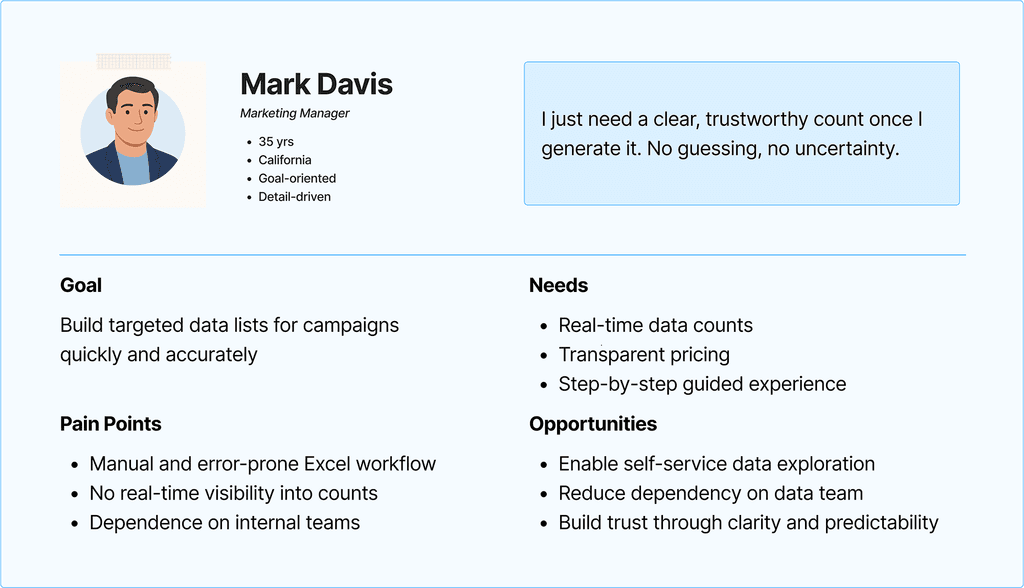
Through stakeholder interviews and workflow observations, I identified two key user groups who interacted with the data-count process.
Key users:
Marketing Managers
Resellers
Through stakeholder interviews and workflow observations, I identified two key user groups who interacted with the data-count process.
Key users:
Marketing Managers
Resellers
USER JOURNEY
USER JOURNEY
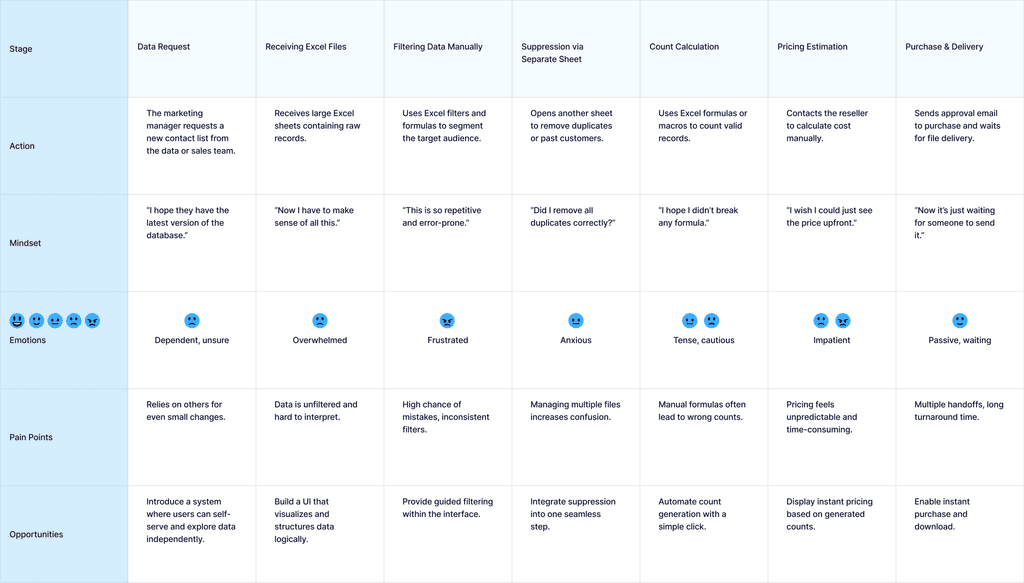
A User Journey for the Marketing Manager (End User) persona
select database → apply filters → add suppression → generate count → purchase data
A User Journey for the Marketing Manager (End User) persona
select database → apply filters → add suppression → generate count → purchase data
Summary Insight:
Summary Insight:
The Excel-based process was fragmented, manual, and dependent on multiple people, leading to errors, inefficiency, and frustration.
This journey clearly revealed the need for a self-service, guided system: one that could combine all these disconnected steps into a single, user-friendly flow.
The Excel-based process was fragmented, manual, and dependent on multiple people, leading to errors, inefficiency, and frustration.
This journey clearly revealed the need for a self-service, guided system: one that could combine all these disconnected steps into a single, user-friendly flow.
USER FLOW
USER FLOW
Iteration 1 - Guided, Step-Based Flow
Iteration 1 - Guided, Step-Based Flow
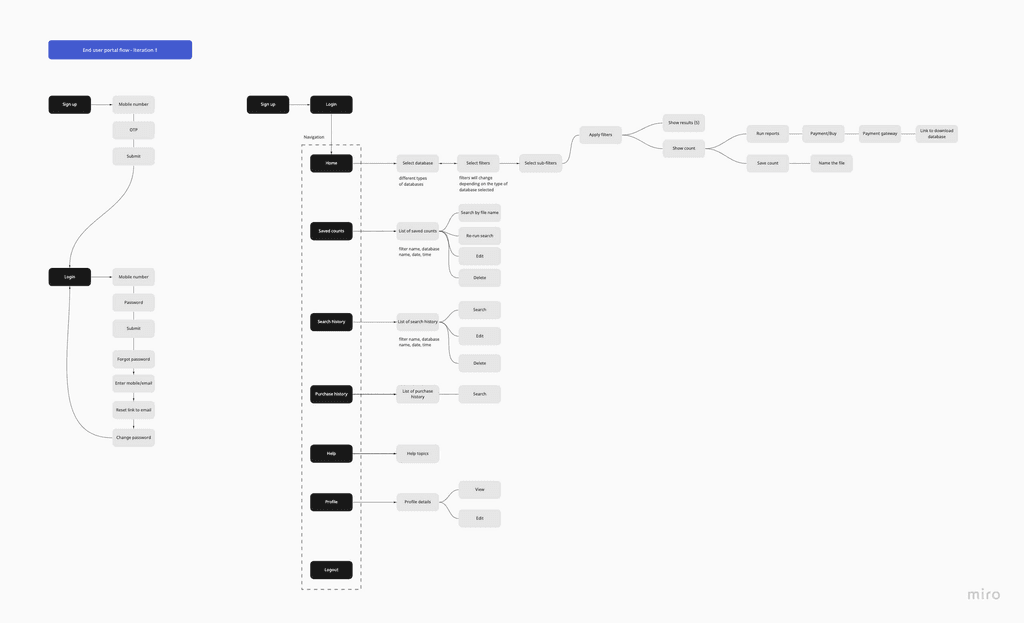
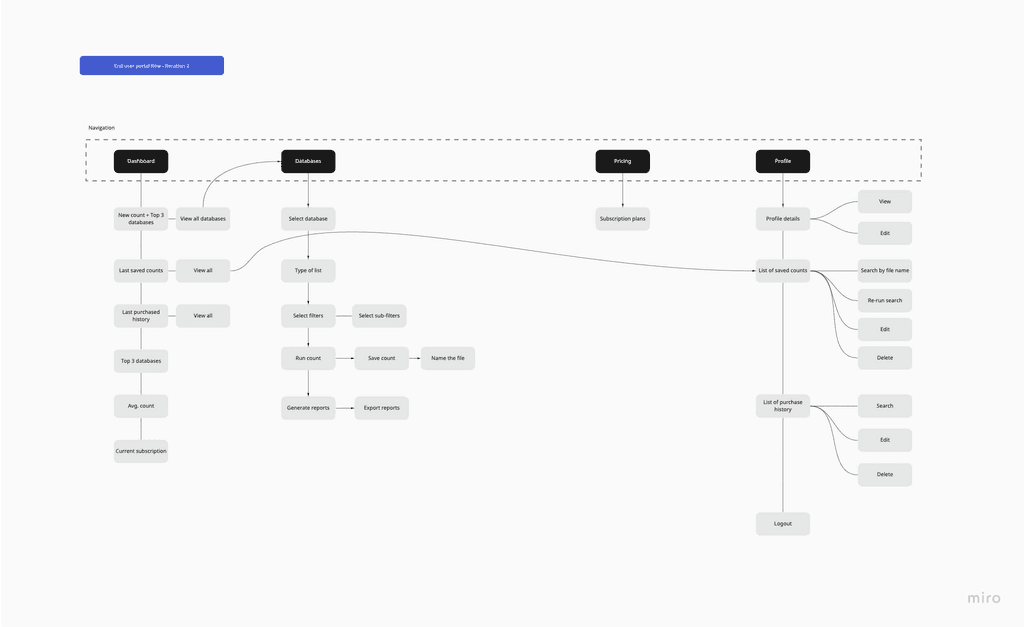
The first user flow was designed as a structured, multi-step process that guided users through each stage, from selecting a database to purchasing data. It helped first-time users understand the process but felt too rigid for experienced users who wanted flexibility.
The first user flow was designed as a structured, multi-step process that guided users through each stage, from selecting a database to purchasing data. It helped first-time users understand the process but felt too rigid for experienced users who wanted flexibility.
💡 Learning: The structure worked well for onboarding new users but added friction for those managing multiple lists daily.
💡 Learning: The structure worked well for onboarding new users but added friction for those managing multiple lists daily.
Iteration 2 - Unified Dashboard Flow
Iteration 2 - Unified Dashboard Flow
The second version evolved into a dashboard-style experience, allowing users to perform all key actions from a single interface. Instead of jumping between screens, they could now manage counts, filters, reports, and history more efficiently.
The second version evolved into a dashboard-style experience, allowing users to perform all key actions from a single interface. Instead of jumping between screens, they could now manage counts, filters, reports, and history more efficiently.
💡 Outcome: The design achieved a balance between guidance and flexibility, empowering both new and power users to work faster without confusion.
💡 Outcome: The design achieved a balance between guidance and flexibility, empowering both new and power users to work faster without confusion.
STRUCTURE AND WIREFRAMES
STRUCTURE AND WIREFRAMES
Structure
Structure
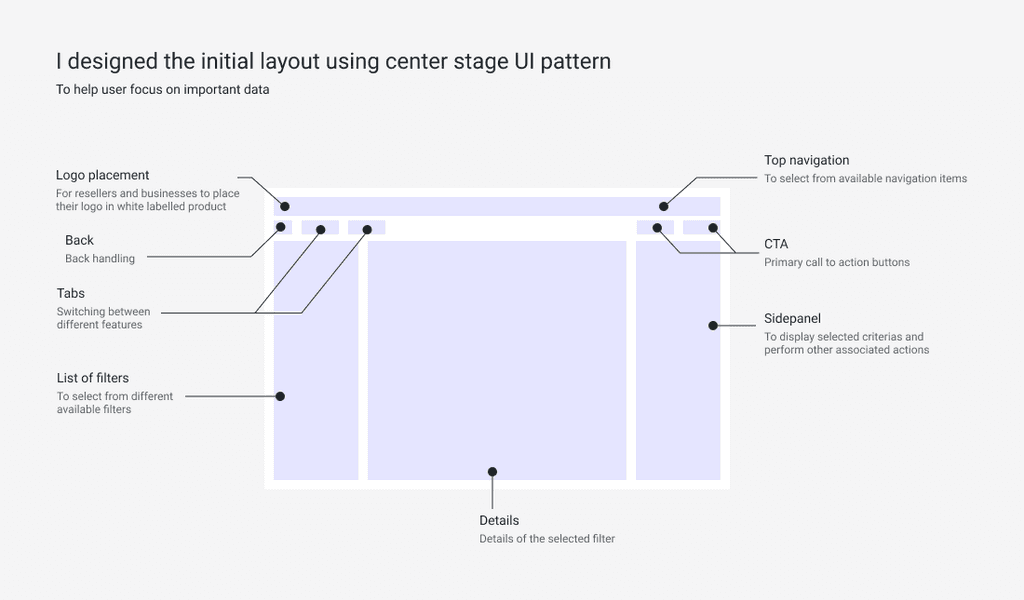
I focused on defining a clean layout that brings key actions to the forefront. The Center Stage UI pattern improved scannability, helping users spot critical information instantly.
I focused on defining a clean layout that brings key actions to the forefront. The Center Stage UI pattern improved scannability, helping users spot critical information instantly.
Wireframes
Wireframes
Working closely with another designer, we created low-fidelity wireframes to validate structure, flow, and user interactions before moving into high-fidelity design. Our focus was on simplifying the count creation journey while ensuring clarity and guidance throughout the process.
Working closely with another designer, we created low-fidelity wireframes to validate structure, flow, and user interactions before moving into high-fidelity design. Our focus was on simplifying the count creation journey while ensuring clarity and guidance throughout the process.
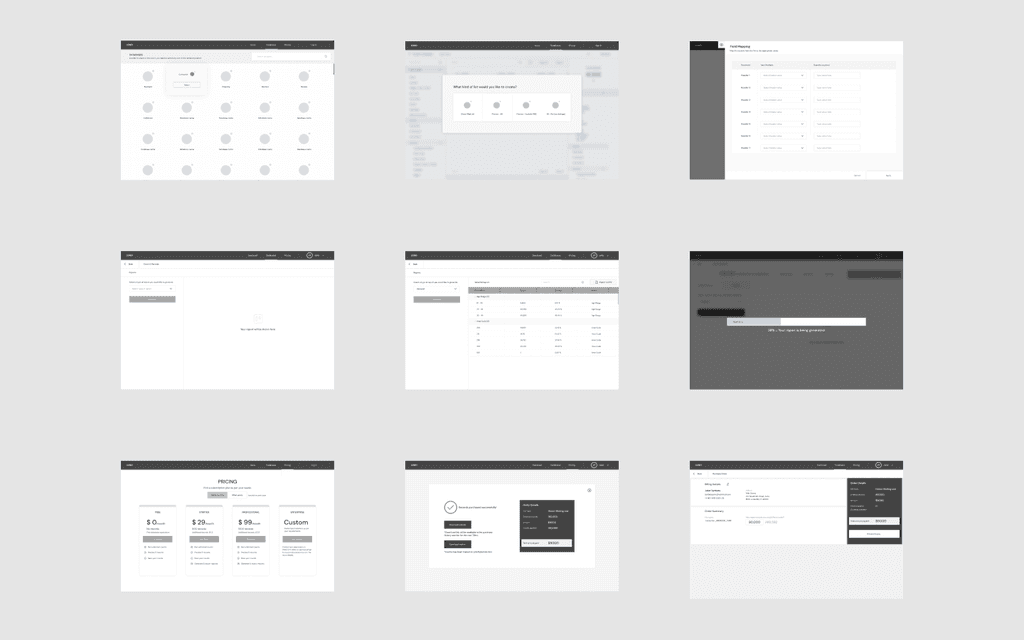
Database Selection: A visual grid to help users browse and pick the right database quickly.
Filter Setup: A guided, step-by-step modal for smooth filter and sub-filter creation.
Saved Reports & History: Structured pages for managing saved counts and purchase history with ease.
Progress Feedback: Introduced a simple progress bar to reassure users during report generation.
Pricing & Checkout: Transparent pricing plans and a confirmation flow that built trust and reduced friction.
This phase helped us align on the information hierarchy and define a consistent layout system for the next iteration.
Database Selection: A visual grid to help users browse and pick the right database quickly.
Filter Setup: A guided, step-by-step modal for smooth filter and sub-filter creation.
Saved Reports & History: Structured pages for managing saved counts and purchase history with ease.
Progress Feedback: Introduced a simple progress bar to reassure users during report generation.
Pricing & Checkout: Transparent pricing plans and a confirmation flow that built trust and reduced friction.
This phase helped us align on the information hierarchy and define a consistent layout system for the next iteration.
STYLE GUIDE AND COMPONENTS
STYLE GUIDE AND COMPONENTS
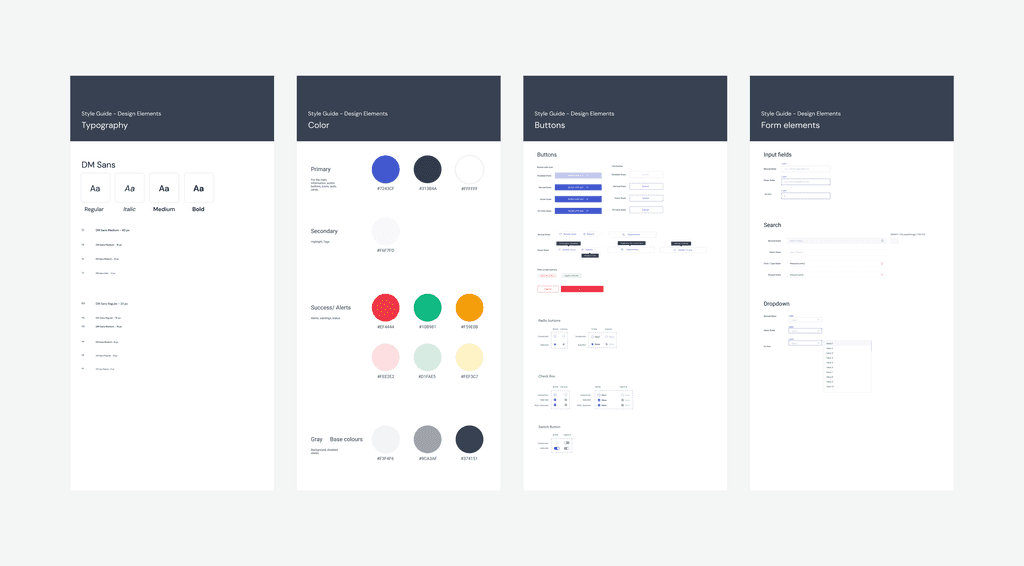
To bring harmony across screens, we created a unified design system: a shared language for both designers and developers.
To bring harmony across screens, we created a unified design system: a shared language for both designers and developers.
HI FIDELITY DESIGNS
HI FIDELITY DESIGNS
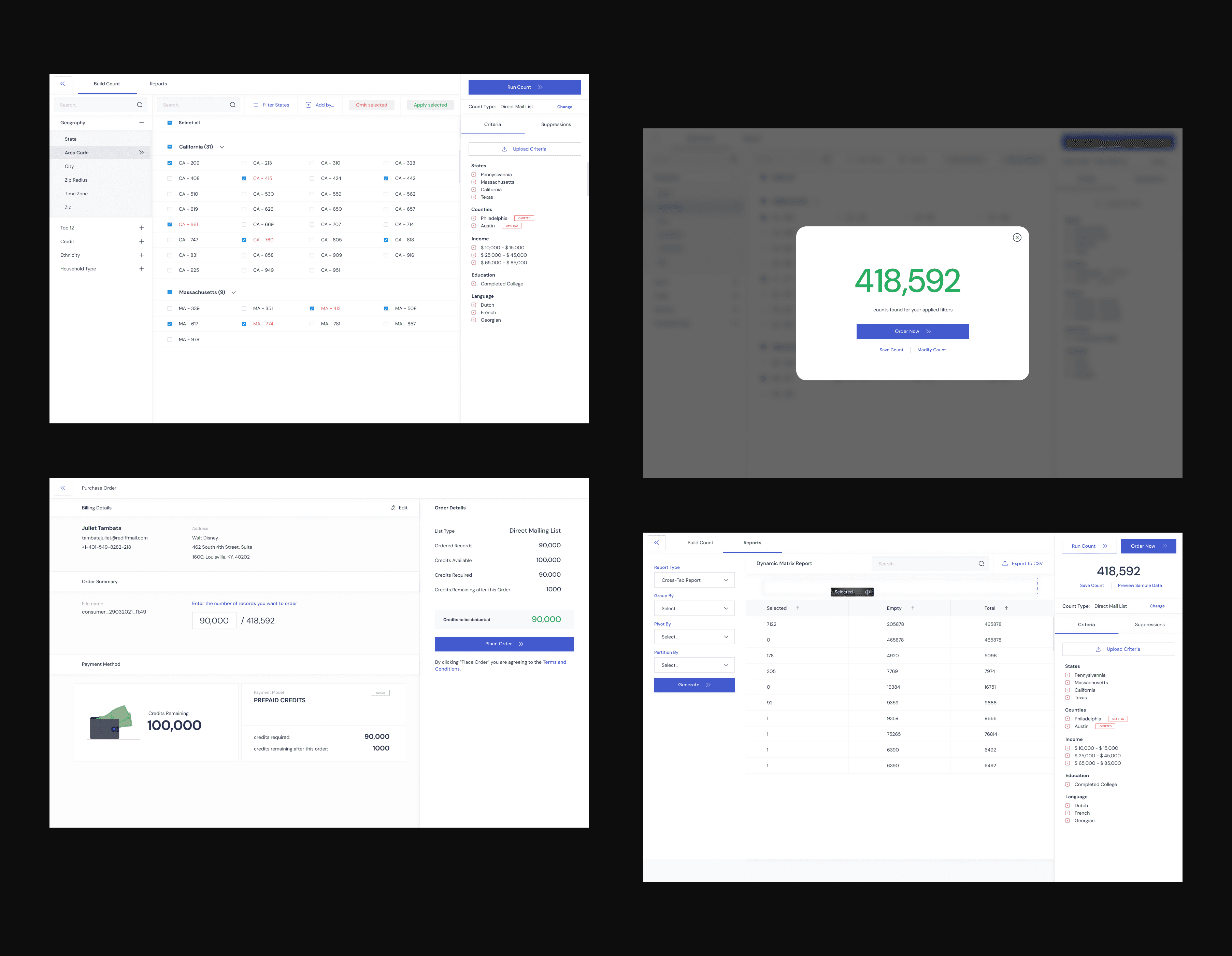
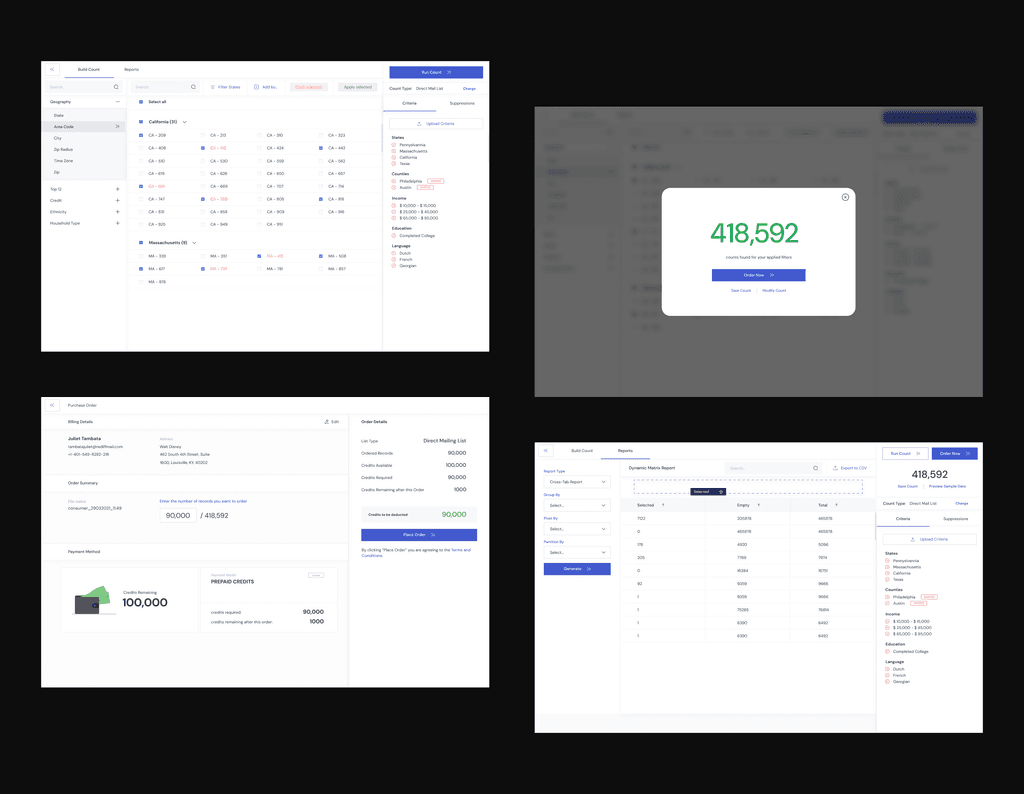
Using the design system as the foundation, I created high-fidelity screens that balanced clarity and functionality. Each screen focused on helping users filter data, view counts, and make confident purchase decisions without friction.
Using the design system as the foundation, I created high-fidelity screens that balanced clarity and functionality. Each screen focused on helping users filter data, view counts, and make confident purchase decisions without friction.
OUTCOME
OUTCOME
60% reduction in time spent generating audience counts.
Clearer purchase flow with transparent pricing
Increased user confidence through guided interactions
CONTACT
Reach out to me if you have new opportunities or design-related discussions.
Reach out to me if you have new opportunities or design-related discussions.
megha.digrase@gmail.com
Copied
megha.digrase@gmail.com
Copied
megha.digrase@gmail.com
Copied